
Start your onboarding here. Discover how our three standalone environments; Data Center, Service Center, and the Knowledge Center - connect to manage your products/licenses, handle your local technical tickets, and deliver instant self-service documentation.
|
Audience: |
All new customers and organisation administrators. |
|---|---|
|
Purpose: |
To introduce the three core components of our platform ecosystem, explain how they work together, and map out your onboarding path. |
|
Estimated reading time: |
3 minutes |
Welcome to our unified service platform ecosystem. Whether you are deploying new product, looking for a technical manual, or reaching out to a local engineer for hands-on support, our ecosystem is built to give you a single, seamless experience across your entire product lifecycle.
While our platform ecosystem is highly connected, it is divided into three distinct environments tailored to specific needs: Data Center, Service Center, and Knowledge Center.
Here is what each portal does and how your onboarding journey begins.
Meet your three standalone portals
1. Data Center: your administrative hub
The Data Center is the central foundation of your ecosystem. It is designed to help you manage your product lifecycle and system preferences efficiently from one unified location.
In the Data Center, you can:
-
Download official product installers.
-
Retrieve, and manage your software licenses.
-
Configure organisation-wide system settings and global notification preferences.
Identity & Access Management (IAM) rule: to maintain strict corporate security, we provision exactly one master Data Center organisation account per company. This is the exclusive portal where your internal organisation Data Center administrator creates new user profiles and directly provisions their access to our ticket tracking service.
2. Service Center: your local ticket system
The Service Center is your primary operational starting point for getting hands-on service, specialised support, and technical assistance from our local service teams.
In the Service Center, you can:
-
Submit structured support tickets regarding product bugs, license inquiries, or technical hurdles.
-
Track the real-time progress, status updates, and SLAs of your open requests.
-
Communicate directly via comments with our local product specialists.
Quick navigation: features a direct, built-in link to the Knowledge Center so you can jump straight to documentation while managing your tickets.
3. Knowledge Center: your self-service library
The Knowledge Center combines all our public documentation, release engineering archives, and knowledge bases into a single, highly intuitive landing homepage.
In the Knowledge Center, you can:
-
Read comprehensive, deep-dive product & portal manuals to understand core system functionalities in full detail.
-
Follow short, byte-sized how-to guides for quick execution of everyday tasks.
-
Search targeted troubleshooting to quickly resolve known system error codes and warning messages.
Public availability: this center is completely public and can be accessed directly from our main corporate website at any time without needing a prior login.
How accounts activation flows
Your journey into the ecosystem is initiated directly by your local sales representative and flows downwards from your administrative hub to your active service channels:
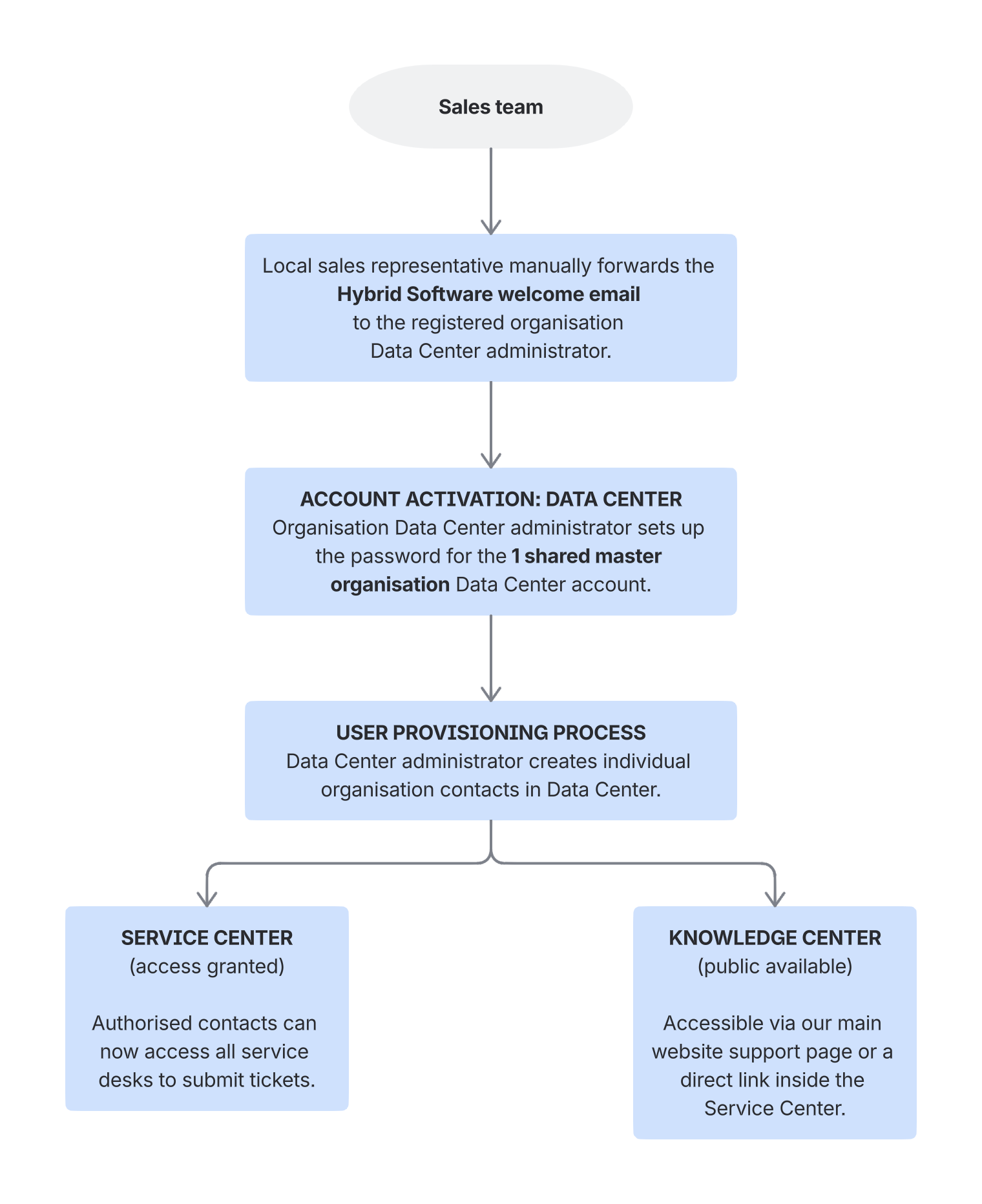
If a team member in your organisation cannot log into the Service Center to submit a ticket, your organisation Data Center administrator must first verify their access status inside Data Center.
The organisation Data Center administrator must be registered as an organisation contact to enable access to Service Center.
Your onboarding roadmap
To ensure a smooth transition to our digital ecosystem, your organisation's setup follows a structured, chronological path. Please complete the onboarding phases in the following order:
-
Phase 1: environment initialisation - The primary organisation administrator must first activate the main hub, establish portal security protocols, and prepare the environment by following the Setting up your Data Center admin account.
-
Phase 2: user access provisioning - Once the administrator portal is secured, the admin manually registers team details and toggles permissions by following the steps to Creating organisation contacts and provisioning Service Center access.
-
Phase 3: operational activation - After the administrator grants Service Center access, individual team members can complete their personal profile setups by following the guide on Activating your Service Center account.
Next steps & related resources
-
👉 Ready to activate your organisation environment? If you are your organisation's primary administrator, your immediate next step is to configure your Data Center portal by reading the Setting up your Data Center admin account.
-
👉 Need to add team members? Once your organisation administrator account is active, learn how to grant Service Center permissions to your colleagues by reviewing Creating organisation contacts and provisioning Service Center access.
-
👉 Are you a regular team member? Skip the administrative steps and go directly to your personal Service Center onboarding instructions under Activating your Service Center account.
-
🌎 Our global channels: visit the official https://hybridsoftware.com/support/ page to view a complete directory of all our available service channels and regional support hotlines.